
1Password
1Password Enterprise is rolling out on campus!
We’re excited to let you know that 1Password Enterprise (plus a free Family Account) is now available for faculty and staff and students are eligible for a free 1Password Personal account.
1Password is replacing our previous UT password manager, Stache. Stache will be retired by December 2026. If you currently use Stache to manage UT credentials, please transition your entries to 1Password as soon as possible.
Why 1Password?
1Password is a secure, user-friendly password manager that helps the UT Austin community safely store and share credentials, improve password hygiene, and support institutional security policies.
Key features include:
- Strong passwords & passkeys – Generate unique passwords and use passkeys for more secure, passwordless sign-ins.
- Secure vaults – Store and organize passwords, credit cards, software licenses, and secure notes.
- Autofill & browser extension – Automatically fill logins and other saved info in browsers and apps using the 1Password browser extension.
- Secure sharing – Share individual items or entire vaults with other users.
- Multiple vaults – Create separate vaults and manage access and settings.
- Cross-device sync – Access your data on desktop, mobile, and browser extensions.
Account Types
- Faculty and staff receive a UT Austin Enterprise 1Password account for university-related credentials, plus a free 1Password Families account for personal and family use.
- Students receive a free four-year personal 1Password account using a UT Austin coupon code and their
@my.utexas.eduemail. This is separate from the UT Austin Enterprise 1Password environment. - Student workers who manage departmental credentials may be given a UT Austin Enterprise 1Password account by their hiring department.
For detailed instructions on activating and using your account, see the 1Password service page in the UT ServiceNow catalog and the 1Password Onboarding FAQ and Support wiki.
What to Expect - Faculty and Staff
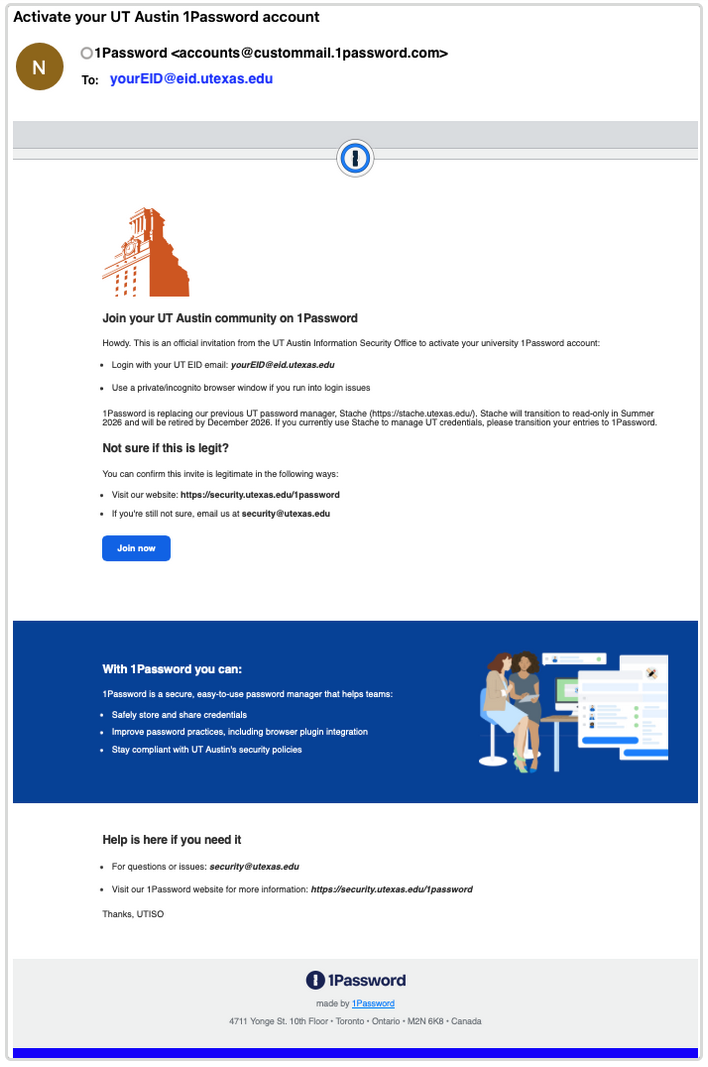
Starting in August 2025, faculty and staff will receive email invitations to join 1Password.
- Look for an email inviting you to “Activate your UT Austin 1Password account.”
- The email will include a Join Now button that takes you to the UT Austin 1Password sign-in page.
- You’ll sign in with your UT EID email (for example,
yourEID@eid.utexas.edu).
Note - you will never be asked to send your password by email. If you’re unsure whether a 1Password message is legitimate, contact security@utexas.edu to confirm.
For more 1Password details, check our 1Password ServiceNow page.
For 1Password Enterprise onboarding details, including screenshots and troubleshooting tips, see our 1Password Onboarding FAQ and Support wiki: https://cloud.wikis.utexas.edu/wiki/spaces/ISO/pages/419334486/1Password+-+Onboarding+FAQ+and+Support
What to Expect - Students
For more 1Password details, check our 1Password ServiceNow page.
Students can follow the instructions in the 1Password for Students section of our ServiceNow page to claim their free four-year personal 1Password account using a UT Austin coupon code: https://ut.service-now.com/sp?id=ut_bs_service_detail&sys_id=3415da181ba03250d65e11f1b24bcb35
What Does this Mean for Stache?
This marks the beginning of our transition away from Stache, the university’s long-standing credential tool, with an estimated retirement date set for Winter 2026.
Stache will be retired by December 2026. If you currently use Stache to manage UT credentials, please transition your entries to 1Password as soon as possible.
More details about the Stache retirement timeline will be shared later.
Questions or Help
For general questions, or to request Enterprise 1Password accounts for yourself, your team, or student workers, email security@utexas.edu
For 1Password Enterprise how-to guides and troubleshooting, see the 1Password Onboarding FAQ and Support wiki.
For additional support details, see our 1Password ServiceNow page
If you have not used the University Wiki Service recently, follow this login guide: https://cloud.wikis.utexas.edu/wiki/spaces/UWS/overview?mode=global. You'll need to log in with your EID email address: yourEID@eid.utexas.edu email address.
If you still get a message that you are unable to access, please reach out to: help@wikis.utexas.edu.